Best Polymarket Copy Trading Bot? Use This Checklist Before You Pick One
Compare Polymarket copy trading bots by execution, wallet analysis, copy filters, risk controls, custody, fees, and Telegram workflow before you trust a setup.

PolyBot Team
Updated August 24, 2026
Maintained by the PolyBot product team with AI-assisted editing. Product claims and linked documentation were reviewed for this update.
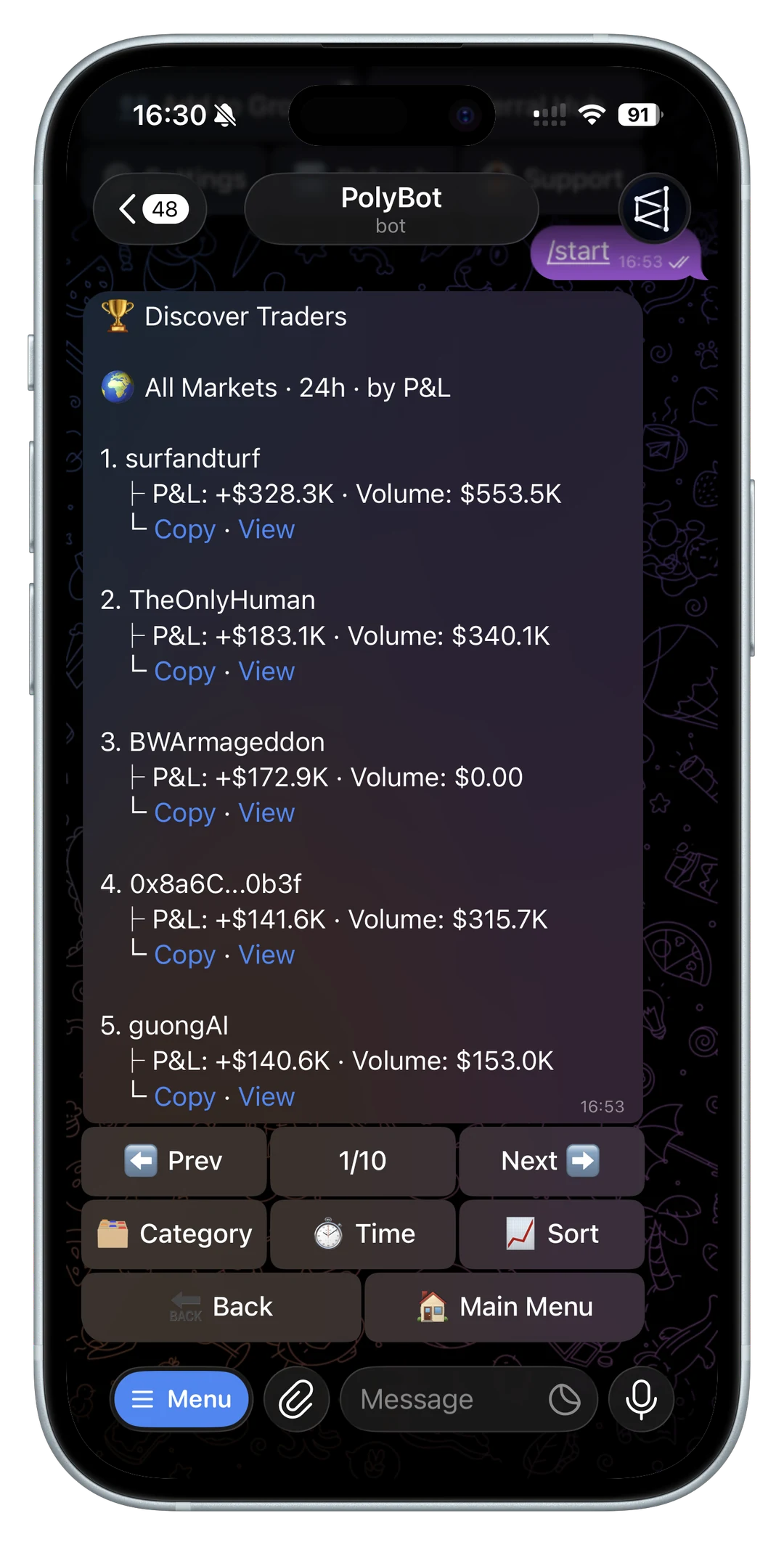
Searching for the best Polymarket copy trading bot usually starts with a simple question: which bot copies profitable wallets fastest?
That is the wrong first question. Speed matters, but copy trading performance is not only an execution problem. A strong setup also needs trader research, filters, sizing rules, slippage controls, risk management, custody clarity, and enough visibility to know when a wallet's edge is fading.
For the broader bot evaluation layer around prediction markets, start with the prediction market trading bot guide, then use this page for copy-specific checks.
If a bot makes copy trading feel like a one-click shortcut, be careful. Prediction markets are public, fast, thin in places, and very sensitive to timing. The best Polymarket copy trading bot for you is the one that helps you make fewer blind decisions, not the one with the loudest claim.
For a full explanation of the workflow before you compare tools, read the Polymarket copy trading guide.
Before judging a tool, make sure you know how to evaluate the trader itself. The best Polymarket traders to copy guide explains how to separate leaderboard hype from repeatable, copyable wallet behavior.
If the workflow lets you paste a trader address, use the Polymarket wallet lookup guide as the baseline for what a good wallet checker should reveal.
If a tool requires direct CLOB credentials or custom infrastructure, read the Polymarket API trading bot guide before treating that setup as safer than a managed bot.
Quick comparison table for Polymarket copy trading bots
| Factor | Weak signal | Strong signal |
|---|---|---|
| Wallet selection | only shows a top trader list | explains realized PnL, volume, category mix, and recency |
| Copy controls | one-click copy with few settings | sizing, category filters, max exposure, slippage, and pause controls |
| Execution claims | only says "fast" | explains order type, liquidity, missed trades, and fill quality |
| Risk controls | copies entries only | supports exits, alerts, stop loss, take profit, and drawdown review |
| Custody | vague wallet language | explains wallet ownership, withdrawals, recovery, and permissions |
| Fees | fee hidden in onboarding | fee, gas, subscription, withdrawal, and spread/slippage costs are easy to find |
| Documentation | marketing claims only | plain docs for orders, settings, failures, and safety |
The pages ranking for "Polymarket copy trading bot" usually answer the same buyer questions: how fast it copies, how the wallet is selected, how custody works, what it costs, and what happens when a copied trade cannot fill cleanly. Use those same questions when comparing PolyBot against any alternative.
For source-level context, Polymarket's docs explain that market data and trading operations are split across the Gamma, Data, and CLOB APIs, that CLOB trading depends on signed orders and authentication for trading endpoints, and that fees are applied at match time. A copy-trading product should make those mechanics understandable for non-developers.

Managed Polymarket trading bot or open-source code?
Polymarket trading tools generally take one of two routes. A managed copy trading bot handles hosting, monitoring, interface updates, and execution infrastructure. Open-source bots give technical users full control over the code, scripts, server configuration, and deployment.
That control comes with work. Open source does not automatically mean free in practice: an operator still has to secure every private key, configure an env file, maintain the software, monitor the Data API and CLOB API, and respond when an order fails or the order book changes. A public repository can show how a system works, but code visibility alone does not prove execution quality or safety.
A managed prediction market tool may put the workflow in a Telegram chat or web dashboard. That reduces setup work, but users still need to verify the custody model, withdrawal access, built-in filters, and what happens when copied trades would execute at a worse price. A non-custodial claim should explain whether you retain access to your own wallet and funds without relying on support.
Whichever route you choose, compare it in three steps:
- Detect: find active wallets and new trades using current market and wallet data, not a stale list of top traders or top wallets.
- Qualify: review past performance, open positions, position sizing, category mix, and whether the apparent edge survives a realistic delay.
- Execute and monitor: set a price limit, maximum size, and daily loss limit; then confirm the bot can cancel, skip, or alert instead of copying the full size at any price.
For the full engineering and operating tradeoff, use the self-hosted Polymarket bot vs Telegram bot guide.
1. Can you analyze the wallet before copying it?
Copy trading starts before the first mirrored order. You need to understand what the wallet is actually good at.
At minimum, look for:
- realized PnL over a meaningful time window
- win rate in context, not by itself
- total volume and average trade size
- market categories where the wallet performs best
- whether gains come from one lucky market or repeated behavior
- whether the wallet trades markets that are still copyable after delay and slippage
This is why PolyBot built a dedicated Polymarket wallet analyzer. A wallet can look strong on a leaderboard or whale alert while still being hard to copy; the leaderboard vs wallet analyzer guide and whale alerts guide explain that gap. The analyzer helps separate repeatable edge from noisy headline numbers.
Before comparing two wallets, separate realized PnL from open, unrealized exposure. A wallet can look profitable while carrying positions that have not resolved or been sold.
2. Does it let you copy with filters?
Blind mirroring is fragile. A good Polymarket copy trading bot should let you decide which parts of a wallet you want to copy.
Useful filters include:
- minimum and maximum copied trade size
- price or odds range
- category or market type
- buy-only, sell-only, or both sides
- per-market caps
- daily caps
- cooldowns between entries
These controls matter because many profitable wallets are not uniformly profitable. A trader may have edge in politics and no edge in sports. Another may be strong on high-conviction trades but weak on small speculative entries. Copying the entire wallet can dilute the part you actually wanted.
For a deeper framework, read the smart money copy trading playbook. Then verify that the tool exposes the sizing, category, slippage, and pause controls you actually need.
3. How does execution quality handle slippage?
In prediction markets, the quoted price can move before a copied order lands. That is especially true in low-liquidity markets and during breaking news.
A copy trading bot should let you control how much price movement you are willing to accept. If the original trader bought at 42 cents and your order would fill at 49 cents, the trade may no longer have the same expected value.
The right slippage setting depends on the type of wallet:
- fast-news wallets may require looser slippage to get filled at all
- thin-margin wallets need strict slippage because late fills can erase the edge
- long-horizon expertise wallets may be less sensitive to a small delay
Execution speed is still important, but it needs to be paired with controls. See why execution speed matters in prediction market copy trading for the mechanics.

4. Does it support position sizing that fits your bankroll?
Copying a trader does not mean copying their dollar amount. A wallet with a much larger bankroll can survive variance that would wipe out a smaller account.
Good sizing controls should support practical modes such as:
- fixed amount per copied trade
- percentage-based sizing
- maximum exposure per market
- daily budget limits
- minimum copied trade threshold
The point is not to make every copied wallet "safe." Trading prediction markets is risky. The point is to make sure your exposure matches your own budget instead of inheriting another wallet's risk profile.
5. Does it show why copied trades fail or skip?
Skipped trades are not always a bug. Sometimes they are the right outcome because the copied trade would violate your settings.
A useful copy trading bot should explain skipped trades in categories a trader can act on:
- balance too low for the copied size
- market liquidity too thin
- slippage limit exceeded
- copied trade below minimum size
- category or market filter blocked it
- leader trade arrived after the price moved
- order rejected because of market, allowance, tick-size, or order-state constraints
This is where product quality shows up. If a bot only says "trade skipped," the user cannot tell whether to loosen settings, reduce size, fund the wallet, or stop copying that trader. PolyBot's copy-trading content treats skipped trades as a decision signal, not only an error message.
6. Can you monitor open positions and apply risk controls?
Copying entries is only half the system. You also need to think about exits.
Look for support for:
- take-profit rules
- stop-loss rules
- trailing stops
- partial exits
- alerts when copied positions move sharply
- clear behavior when the leader exits or reverses
If a bot copies entries but gives you no way to manage downside, the setup can become passive in the worst way. You are still taking risk, but you are not actively shaping it.
PolyBot combines copy trading with automated strategy and exit controls, so entries and risk rules can live in the same Telegram workflow.
7. Is a non-custodial wallet model explained clearly?
Any trading bot that touches funds should make custody easy to understand.
Before using a Polymarket copy trading bot, ask:
- Who controls the wallet?
- Can I withdraw when I want?
- Can I export or recover access?
- Are private keys or signer permissions explained clearly?
- Which network and asset does the bot use?
PolyBot is built around a Safe wallet flow. If you are comparing Telegram bots, custody should be one of the first sections you read, not a footnote.
For credential boundaries, read Polymarket API keys, wallet permissions, and Telegram bot safety before connecting funds to any bot.
8. Are trading fees and gas costs obvious?
Fees change copy trading math. A wallet with a thin edge may not stay profitable after bot fees, worse fills, and any network or withdrawal costs.
A useful fee page should answer:
- Is there a trading fee?
- Is there a subscription?
- Are deposits or withdrawals charged?
- Is gas sponsored or paid by the user?
- Does the fee apply to buys, sells, or both?
- Are there minimum trade sizes?
If the numbers are vague, treat that as a risk signal.
For costs, separate protocol fees, bot fees, spread, slippage, and any gas or withdrawal charges. Verify the current figures in official documentation before funding a tool.
9. Does the Polymarket trading bot fit your actual workflow?
Some traders want a pure copy trading bot. Others want manual trading, limit orders, alerts, group workflows, and automated strategies in the same place.
PolyBot is built for the second workflow: trade Polymarket from Telegram, analyze wallets, copy selected traders, manage risk, and automate strategies without constantly jumping between tools. Start with the Telegram trading bot guide if you want the full product overview.
If you are comparing specific tools, the PolyBot comparison hub breaks down major Polymarket Telegram bot alternatives.
Questions to ask before choosing a copy trading bot
What is the most important feature in a Polymarket copy trading bot?
Wallet analysis and copy controls matter more than raw speed claims. Fast mirroring is useful only when the bot also lets you filter wallets, cap exposure, control slippage, and stop automation quickly.
Should beginners copy the top Polymarket leaderboard wallet?
Not automatically. A top-ranked wallet may have one large win, thin-liquidity entries, or a strategy that requires more capital than you have. Past performance does not guarantee future results. Use a wallet analyzer and start with small capped exposure before trusting any leaderboard signal.
Is a Telegram copy trading bot safer than a self-hosted bot?
It depends on custody, permissions, documentation, and your operational skill. A Telegram workflow can be easier to monitor, while a self-hosted bot requires more engineering and security work. In both cases, verify wallet control and withdrawal paths before funding.
Choose controls over speed claims
The best Polymarket copy trading bot is not just the one that mirrors fastest. It is the one that helps you choose better wallets, copy only the parts worth copying, manage slippage, control sizing, and understand custody and fees before capital goes live.
Use automation carefully. Copy trading can save time, but it does not remove market risk, liquidity risk, or the need to evaluate the wallet you follow.
Not investment advice. Copy trading can lose money, and bot features should be verified against current product docs before funding.
Polymarket Copy Trading: How It Works and How to Start From Telegram
Learn how Polymarket copy trading works, how to choose wallets, configure filters, control slippage, size positions, and manage risk from Telegram with PolyBot.
Copy Trading / 13 min
Self-Hosted Polymarket Bot vs Telegram Bot: Which Workflow Fits?
Compare self-hosted Polymarket bots with Telegram trading bots by engineering effort, ops burden, wallet analysis, copy trading, and risk controls.
Comparison / 10 min