How to Copy Trade on Polymarket From Telegram Without Blindly Following Whales
Learn a practical Polymarket copy-trading workflow: find wallets, analyze edge, set filters, control slippage, size positions, and monitor results from Telegram.

PolyBot Team
Updated June 2, 2026
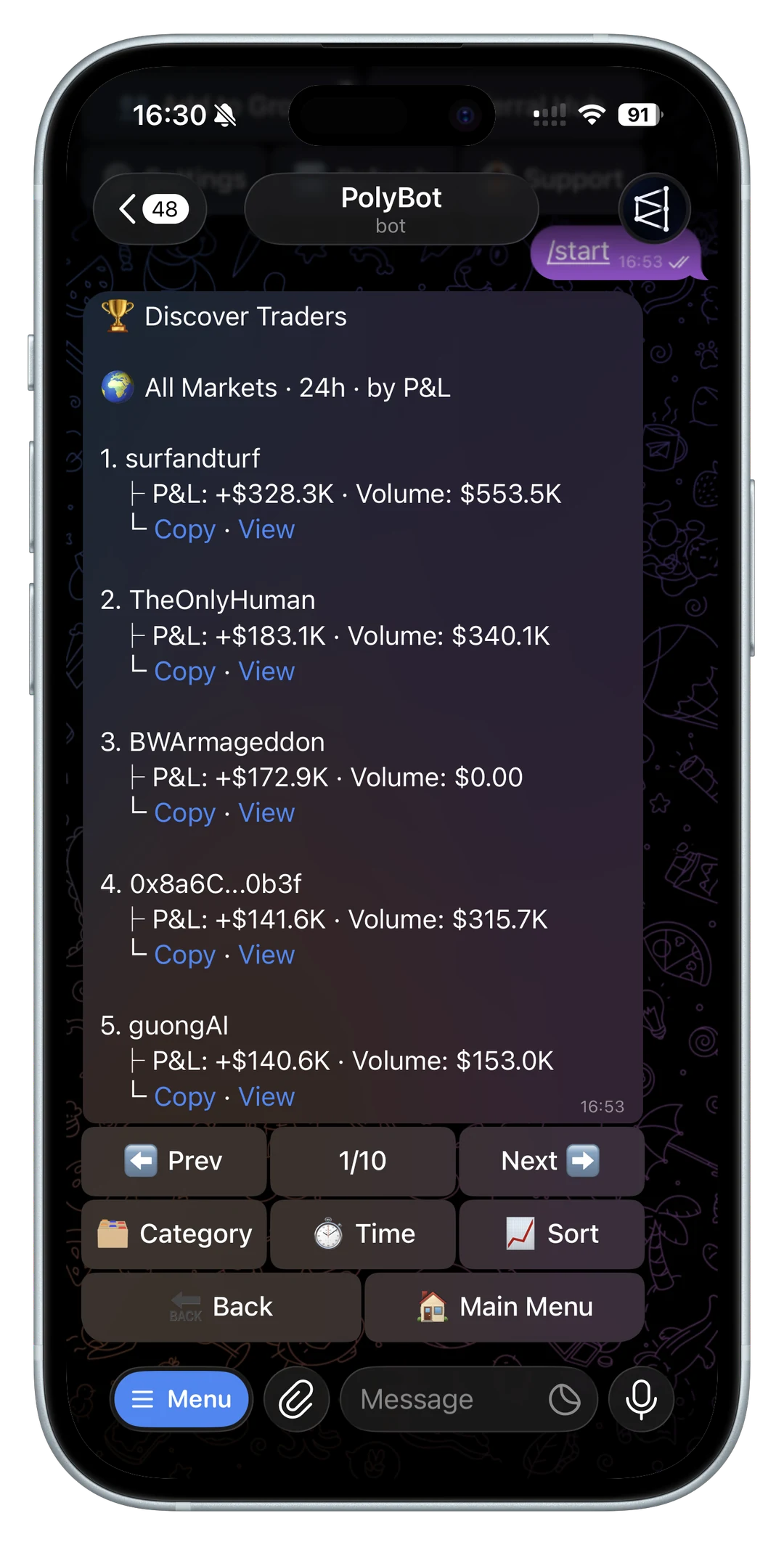
Copy trading on Polymarket sounds simple: find a profitable wallet, mirror its trades, and let the edge come to you.
In practice, the hard part is not clicking "copy." The hard part is deciding who to copy, which parts of their activity to copy, how much to size, and when to stop. Prediction markets move quickly, and a wallet that looks brilliant on a leaderboard can still be a bad copy target if the trades are illiquid, too fast, or too concentrated in one lucky event.
This is a practical workflow for copy trading Polymarket from Telegram without blindly following whales.
For the broader overview of how Polymarket copy trading works, start with the Polymarket copy trading guide, then use this article as the step-by-step Telegram setup.
Quick answer: how do you copy trade on Polymarket?
To copy trade on Polymarket, you need five things:
- a wallet or trader profile worth analyzing
- a way to inspect the wallet's real trading behavior
- copy settings for size, categories, price limits, and slippage
- risk controls for missed trades, bad fills, exits, and drawdowns
- a monitoring loop that compares your copied fills against the source wallet
The safest workflow is not "paste the top wallet and mirror everything." It is: find a candidate, analyze whether the trader's edge is repeatable, copy only the market types you understand, cap exposure, and stop copying when the copied result no longer tracks the original wallet.
Official Polymarket docs are useful context for this workflow because copy trading still depends on the same market data, order book, order placement, and fee mechanics as manual trading. Keep the Polymarket API overview, CLOB trading overview, and Polymarket fees documentation open when you compare execution claims.

Copy trading setup checklist
| Step | What to check | Why it matters |
|---|---|---|
| Find a trader | wallet activity, realized PnL, market categories, recent trades | a leaderboard rank can hide luck or stale performance |
| Analyze copyability | trade size, liquidity, timing, repeat behavior | profitable wallets are not always easy to copy |
| Configure sizing | fixed amount, percentage sizing, per-market cap, daily cap | your bankroll may be much smaller than the source wallet's |
| Control price quality | slippage limit, order type, liquidity checks | late copied fills can erase the leader's edge |
| Add exits | stop loss, take profit, alerts, leader-exit behavior | copying entries without exit logic leaves risk unmanaged |
| Monitor results | copied PnL, missed trades, fill gap, drawdown | edge can decay after the setup goes live |
If a copy-trading product skips several rows in this table, it may still be fast, but it is harder to trust with meaningful size.
Step 1: Build a shortlist of wallets
Start by finding wallets with enough activity to analyze. You are looking for evidence, not hype.
Good early signals include:
- positive realized PnL over a meaningful period
- enough trades to reduce luck as the main explanation
- repeat activity in one or more market categories
- trade sizes large enough to matter
- recent activity, not an old abandoned wallet
- markets that still have enough liquidity for followers
For a broader signal checklist, read the Polymarket trading signals bot guide before turning wallet activity, alerts, or group posts into a copy setup.
For a dedicated selection framework, read the best Polymarket traders to copy guide before turning a leaderboard result into a subscription.
If you are starting from a ranked list, use the Polymarket leaderboard guide to separate PnL rank, volume rank, category rank, and recent activity.
If you are starting from a raw wallet address or profile link, use the Polymarket wallet lookup guide before analyzing whether the trader is copyable.
If you are starting from a shared profit screenshot, use the Polymarket PnL card guide before treating one visible win as enough evidence to copy.
Do not assume the biggest wallet is the best wallet to copy. Large accounts can take positions you cannot reasonably mirror. They may also move the market with their own size, leaving followers with worse fills. Read Polymarket whale alerts and wallet tracking before treating large-wallet activity as an automatic signal.
Step 2: Analyze the wallet before copying
Before you activate any copy setup, run the wallet through a real analysis process.
The PolyBot wallet analyzer is built for this step. It helps you inspect a wallet's edge profile, category mix, sizing distribution, win rate, PnL behavior, and recommended copy setup.
The most important question is not "Did this wallet make money?" It is "Can this wallet's behavior be copied with my budget, latency, and risk limits?"
For a deeper breakdown of the metrics, read the Polymarket wallet analyzer guide.
Step 3: Identify the type of edge
Different wallets win for different reasons. Copy settings should match the edge.
Common edge types:
- Expertise edge: the wallet understands a category better than the crowd.
- Strategy edge: the wallet follows a repeatable setup across many markets.
- Information edge: the wallet reacts faster than most traders.
- Sizing edge: the wallet knows when to press and when to stay small.
If you treat all of these the same, you will copy poorly. A politics specialist may need category filters. A fast-news wallet may need better execution. A full-basket strategy may require enough budget to copy every related position.
For politics-specific copy risk, read the Polymarket politics and election trading bot guide before following wallets that trade election markets.
For crypto-specific copy risk, read the Polymarket crypto trading bot guide before following wallets that trade fast up/down markets.
The smart money copy trading playbook goes deeper on this framework.

Step 4: Set copy filters
Filters are what turn blind mirroring into a controlled setup.
Useful filters include:
- category filter
- minimum leader trade size
- maximum copied trade size
- odds or price range
- per-market cap
- daily cap
- buy-only or sell-only mode
- slippage limit
Example: if a wallet is strongest in NBA markets and weak everywhere else, copying all categories may reduce the edge. If a wallet only performs well on large high-conviction entries, copying every small trade may add noise.
For a sports-specific checklist, read the Polymarket sports trading bot guide before following wallets that trade live games.
The best copy setup is usually narrower than the wallet's full activity.
For a setting-by-setting breakdown, read the Polymarket copy trading settings guide.
Step 5: Size around your own bankroll
Never copy another wallet's dollar size just because it worked for them.
A wallet with a six-figure bankroll can absorb drawdowns that a smaller account cannot. It may also use position sizes that only make sense inside a larger portfolio.
Practical sizing rules:
- start smaller than you think you need
- cap exposure per market
- cap daily copied volume
- avoid copying every wallet at the same size
- increase only after you have enough tracked results
Copy trading should fit your bankroll, not the leader's.
For a deeper sizing framework, read the Polymarket copy trading bankroll and drawdown guide.
Step 6: Control slippage
Slippage is one of the biggest differences between a leader's result and a follower's result.
If the leader buys at 41 cents and you fill at 48 cents, you are not taking the same trade. You are taking a later, more expensive version of it.
Use stricter slippage when:
- the leader's margins are thin
- the market is illiquid
- the wallet trades slowly developing markets
Use more flexible settings only when the wallet's edge depends on getting in quickly and the expected edge can survive worse fills.
Read why execution speed matters before copying fast-news wallets.
If you are manually reacting to wallet signals instead of subscribing to copy trading, read the Polymarket sniper bot guide before chasing the same entry.
Step 7: Add exit logic
Many copy-trading setups focus on entries and ignore exits. That is a mistake.
Think through:
- What happens if the market moves against you quickly?
- Do you need a stop loss?
- Should profits be taken automatically at a target?
- Do you want alerts instead of automatic exits?
- Should the copied position close when the leader exits?
PolyBot combines copy trading with risk tools and automated strategy controls, so you can manage entries and exits from the same Telegram workflow. The Telegram trading bot guide explains the full setup.
Step 8: Monitor whether the wallet still works
A copied wallet is not a permanent asset. Edge can decay.
Track:
- copied PnL versus leader PnL
- fill quality
- categories where copies perform best
- slippage by market type
- drawdowns
- changes in the leader's trading behavior
If many leader trades do not copy, use the Polymarket copy trading skipped trades guide before changing slippage, sizing, caps, or filters.
If the wallet changes style, loses discipline, or starts trading markets you do not want, adjust or stop the setup.
Do not judge after one lucky copied win. Use the copy trading sample size guide before increasing size.
What a Polymarket copy trading bot should explain
Search results for Polymarket copy trading are full of speed claims. Speed matters, but a serious copy-trading workflow should also explain the parts that decide whether the copied trade is actually similar to the original.
Before using any Polymarket copy trading bot, look for plain-language answers to these questions:
- How does the bot choose or evaluate wallets before copying?
- Can you copy only specific categories, markets, or trade-size bands?
- Can you set max exposure per market and per copied wallet?
- What happens when the leader trade is too large for available liquidity?
- How are slippage, partial fills, skipped trades, and rejected orders shown?
- Does the bot copy exits, only entries, or a configurable mix?
- How are fees, gas, withdrawals, and custody explained?
If those answers are missing, read the best Polymarket copy trading bot checklist before funding the setup.
A practical Telegram workflow
Here is the clean version:
- Find a candidate wallet.
- Analyze it with the wallet analyzer.
- Decide which edge you are trying to copy.
- Set filters, sizing, caps, and slippage.
- Add risk controls.
- Monitor the copied results.
- Drop wallets when the edge stops being clear.
That is what copy trading should be: a controlled process, not a blind bet on a leaderboard.
Practical questions about copying Polymarket wallets
How many trades should I review before copying a wallet?
There is no universal number, but one or two wins is not enough. Review whether results repeat across markets, whether the wallet is still active, and whether the entries remain copyable after slippage and fees.
Should I copy every trade from a profitable wallet?
Usually no. Many wallets have a specific category, size band, or market type where they perform best. Copy filters help isolate that behavior instead of mirroring unrelated noise.
What should I monitor after copy trading starts?
Track copied PnL, leader PnL, missed trades, fill prices, slippage, category mix, and drawdowns. If copied results diverge from the source wallet, reduce size or pause before adding more capital.
Not investment advice. Copy trading can lose money, and prediction markets can move faster than your rules can protect you.
Polymarket Copy Trading: How It Works and How to Start From Telegram
Learn how Polymarket copy trading works, how to choose wallets, configure filters, control slippage, size positions, and manage risk from Telegram with PolyBot.
Copy Trading / 13 min
Polymarket Copy Trading Settings: Sizing, Slippage, Caps, and Filters
How to configure Polymarket copy trading settings before mirroring a wallet: fixed vs proportional sizing, slippage, daily caps, price filters, category filters, stop losses, skip reasons, and performance review.
Copy Trading / 13 min