Polymarket Trading Signals Bot Guide: Alerts, Wallet Signals, Copy Trading, and Safer Telegram Execution
How to use Polymarket trading signals from Telegram without blindly chasing alerts: price targets, price-change alerts, big trades, wallet signals, copy trading, liquidity checks, and execution rules.

PolyBot Team
Updated June 1, 2026
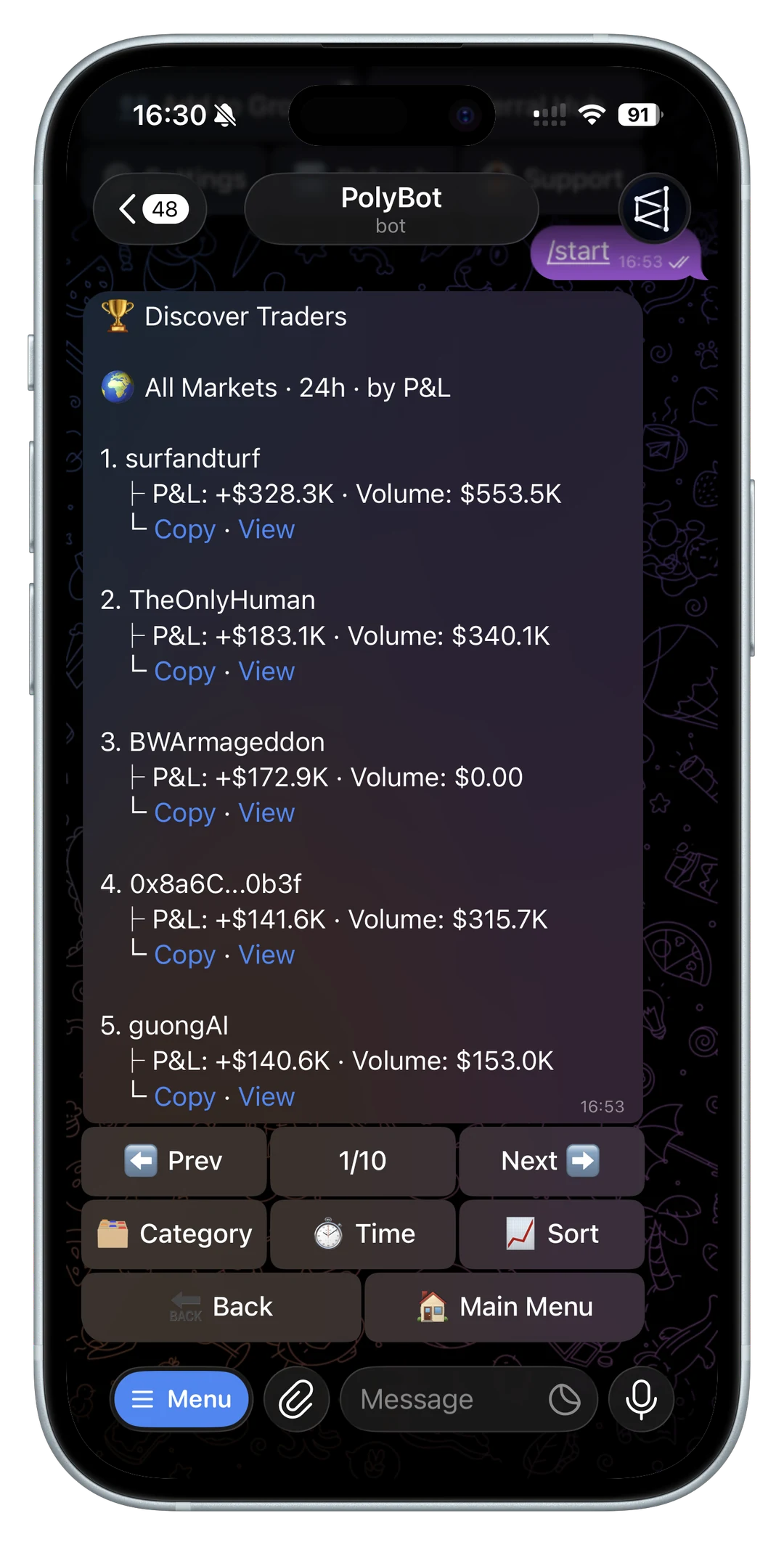
A Polymarket trading signals bot is useful only if it helps you decide what to review next.
It should not make every alert feel like an automatic trade. Prediction markets move on news, liquidity, wallet activity, category knowledge, and order-book changes. A price alert, large trade, copied-wallet notification, group message, or trending market can all point to something worth checking. None of them prove that the current price is still good.
This guide explains how to use Polymarket signals from Telegram as a workflow: what counts as a signal, what to check before acting, when to use an alert instead of a trade, when copy trading fits, and how to keep signal-driven execution from becoming noise.
If your signal workflow depends on Telegram notifications across markets, wallets, copied trades, order status, and portfolio events, read the Polymarket notification bot guide alongside this page.
If the signal starts from a target price or price-change threshold, use the Polymarket price alerts bot guide before treating the alert as an order instruction.
If you use AI to summarize, score, or rank signals, read the Polymarket AI trading bot guide so model output stays separate from order execution.
If you are comparing signals with copy trading, auto trading, and fast manual execution, use the prediction market trading bot guide as the broader workflow map.
If signals are coming from volume, trending markets, wallet activity, or category scans, read the Polymarket market scanner bot guide before turning discovery into orders.
If the signal starts from a headline or breaking event, use the Polymarket news trading bot guide to separate source verification, market wording, liquidity, and order timing before acting.
If the signal is a volume spike, trending market, or price-change alert, use the Polymarket volume alerts bot guide before treating attention as edge.
If the signal may become an immediate fill, resting limit order, or post-only quote, use the Polymarket maker vs taker guide before deciding how the order should reach the book.
If you want the product overview first, start with the Telegram trading bot for Polymarket. If you already use alerts, pair this with the Polymarket Telegram alerts and watchlists guide.
If you want the fast-entry version of this workflow, read the Polymarket sniper bot guide before turning signals into immediate orders.
What counts as a Polymarket signal?
A signal is any event that tells you a market, wallet, or position deserves attention.
Common Polymarket signals include:
- a price target alert firing
- a price-change alert showing sudden movement
- a big-trade alert from a watched market
- a whale wallet buying or selling
- a copied wallet entering a new position
- a copied trade skipping or failing
- a market trending in search
- a group chat sharing a market link
- an order book changing enough to affect execution
- a position reaching a stop-loss or take-profit area
Some signals are market signals. They say something may have changed in the market.
Some signals are wallet signals. They say a trader may be worth analyzing.
Some signals are operational signals. They say your own setup needs review.
Treating all three the same is the mistake. A big buy, a price move, and a failed copied order need different next actions.

Signals are not trade instructions
The safest mental model is simple:
Signal first. Review second. Trade third.
Before acting on any signal, check:
- exact market wording
- outcome side
- current bid and ask
- spread
- visible liquidity
- order-book depth
- expiry and time remaining
- resolution source
- whether the signal is stale
- whether your trade size can fit the book
- whether a limit order is better than a market order
For the execution layer behind those checks, read Polymarket liquidity, spread, and slippage and the Polymarket order book guide.
For fast manual entries after those checks, use the Polymarket sniper bot guide as the execution checklist.
Price target signals
A price target signal tells you a market outcome reached a level you care about.
PolyBot's Market Alerts docs describe price target alerts where the user chooses a target price in cents and receives a Telegram notification when the condition is met.
That is useful when you already know what price would make the market worth reviewing. It is not the same as a limit order.
Use price target alerts when:
- you want to inspect the book before buying
- you are waiting for a better entry
- you want to reduce or exit at a level
- you are watching a market you do not own yet
- you want a notification without automatic execution
After the alert fires, ask:
- Is the price still there?
- Did the spread widen?
- Is there enough depth for my size?
- Did the underlying news change?
- Is the remaining time still compatible with the idea?
If you already know the exact price, side, size, and duration you are willing to accept, a Polymarket limit order may be a better tool than an alert.
Price-change signals
A price-change signal tells you that a market moved by a meaningful percentage.
This can be useful for breaking news, live sports, crypto up/down markets, election updates, or fast social attention. It can also be noisy because the move may already be priced in by the time the alert arrives.
Use price-change alerts for attention, not confirmation.
Before trading after a price-change alert, ask:
- What caused the move?
- Is the move still continuing?
- Did liquidity follow the move?
- Is the current price better than your estimate?
- Is the market reacting to real information or only momentum?
- Would waiting for a limit order be safer?
For fast crypto moves, read the Polymarket crypto trading bot guide. For live games, read the Polymarket sports trading bot guide.
Big-trade and whale signals
A big trade can be useful because size sometimes reveals conviction, hedging, information, or urgency.
It can also be misleading.
A whale wallet may have:
- a different bankroll
- a hedge in another market
- a better entry than you can get now
- a longer time horizon
- a private reason you cannot verify
- enough size to move the book
- a history that looks good only in one category
If a large trade fires a signal, separate two questions.
Market question:
- Did the trade change price?
- Did the book thin out?
- Is the market wording still clear?
- Is there still a fair entry after the trade?
Wallet question:
- Is this wallet consistently useful?
- Does the wallet win in this category?
- Are entries copyable after delay and slippage?
- Does sizing show real conviction or random risk?
- Would your bankroll survive copying this behavior?
For this workflow, use the Polymarket whale alerts and wallet tracker guide, the Polymarket wallet analyzer, and the best Polymarket traders to copy guide.

Wallet signals and copy trading
Copy trading turns wallet signals into possible execution.
PolyBot's Copy Trading docs describe following a trader while controlling sizing, filters, slippage, daily caps, execution mode, and risk controls. That matters because a useful wallet signal can become a bad copied trade if your settings are too loose.
Before copying from a signal, decide what you are actually copying:
- a category edge
- a fast-news reaction
- a crypto up/down strategy
- a sports specialist
- a politics specialist
- a full basket across related markets
- a large high-conviction trade
- a low-frequency wallet with rare but strong entries
The setup should match the edge.
If the signal is category-specific, use category filters. If the signal is time-sensitive, slippage and execution mode matter more. If the signal depends on a full basket, copying only one leg may change the trade.
Use how to copy trade on Polymarket from Telegram for the workflow and Polymarket copy trading settings for the control surface.
Group chat signals
Telegram groups can surface markets quickly.
That is useful because prediction-market ideas often begin with a link, chart, headline, wallet screenshot, or someone asking whether a market exists. It is risky because group chat can make weak evidence feel urgent.
Before acting on a group signal, ask:
- Who shared it?
- Is there a market link or only a claim?
- Did anyone verify the market wording?
- Is the current price still attractive?
- Is the group discussing evidence or only momentum?
- Are multiple people chasing the same thin book?
- Would a personal limit order or alert be safer?
Use the Polymarket Telegram group trading guide when the signal starts in chat. Use the Polymarket market search guide when the signal starts as a topic instead of a market link.
Category-specific signals
Signals behave differently by category.
Sports signals often depend on live context: injuries, lineups, score state, clock, weather, and market timing. A market can move faster than the group discussion around it.
Politics and election signals often depend on source quality: polls, campaign news, legal events, prediction updates, and resolution wording. A headline can be relevant but still not change the market enough to trade.
Crypto signals can decay quickly. BTC, ETH, SOL, and short-window up/down markets can move before a manual trader finishes reviewing the book.
For category-specific checks, use:
- Polymarket sports trading bot guide
- Polymarket politics and election trading bot guide
- Polymarket crypto trading bot guide
Turn a signal into the right action
The right response to a signal is not always a trade.
Possible actions:
- ignore it
- add the market to a watchlist
- create a price alert
- inspect the order book
- place a limit order
- place a smaller market order
- copy the wallet with narrow settings
- pause a copy setup
- tighten slippage
- reduce position size
- set a stop loss or take profit
- sell or reduce an existing position
The action should match the signal quality.
Weak signal, wide spread: no trade or alert-only.
Useful signal, thin book: limit order or smaller size.
Strong wallet signal, unclear copyability: analyze the wallet before subscribing.
Known setup, repeatable rules: strategy automation may fit.
For automated rule design, read trading strategies for crypto up/down markets and the Polymarket API trading bot guide before building custom order-placement loops.
Post-trade signals matter too
Many traders focus only on entry signals.
Post-trade signals are just as important:
- order filled worse than expected
- order partially filled
- order failed
- copied trade skipped
- leader sold but follower did not
- stop loss triggered
- take profit triggered
- position moved against the thesis
- market resolved
- winning shares are redeemable
These are operational signals. They tell you whether the workflow is behaving.
Use the Polymarket order failed guide, copy trading skipped trades guide, stop-loss and take-profit guide, portfolio and orders guide, and auto-claim guide to keep the post-trade loop clean.
Measure signal quality
A signal workflow improves only if you review outcomes.
Track:
- signal type
- market category
- time received
- price at signal
- price at review
- bid and ask at review
- action taken
- fill price
- slippage
- result
- whether you would take the same setup again
If a signal often arrives too late, use it for research, not entries.
If a wallet signal works only in one category, filter the copy setup.
If a group signal repeatedly creates rushed trades, move it to watchlist or alert-only.
If price-change signals are noisy, raise thresholds or mute markets that do not fit your plan.
Polymarket signals checklist
Before using a signal from Telegram, answer:
- What kind of signal is this: price, wallet, group, search, or operational?
- What changed since the signal fired?
- Is the exact market and outcome clear?
- What are the current bid, ask, spread, and depth?
- Is this a market signal or a wallet signal?
- Is there enough liquidity for my size?
- Would a limit order be safer than a market order?
- If copying, are my filters, slippage, and caps aligned with the leader?
- What is my exit plan?
- What would make me ignore the next similar signal?
If those answers are unclear, the signal is not ready to become a trade.
Polymarket trading signals questions
Does PolyBot provide Polymarket trading signals?
PolyBot supports workflows that can produce useful signal notifications, including market alerts, price changes, big-trade alerts, copy-trading notifications, wallet analysis, and group trading flows. Those signals still require trader review.
Are Polymarket alerts the same as trading signals?
They can be used as signals, but an alert is only a notification that a condition was met. It does not prove that the current price, liquidity, or timing is still good.
Should I automatically trade every signal?
Usually no. Many signals should lead to review, a watchlist, a limit order, or no action. Automatic execution fits only when the rules, size, slippage, and exit plan are already defined.
Are whale trades good Polymarket signals?
Sometimes. A large wallet trade can point to useful information, but it can also be a hedge, a one-off, or impossible to copy cleanly after the book moves.
What is the safest first signal workflow?
Start with alerts and manual review. Track whether signals are timely and useful before increasing size, copying wallets, or automating entries.
Not investment advice, financial advice, legal advice, or trading advice. Prediction markets can lose money, signals can arrive late, and every trade should be checked against current market conditions before execution.
Polymarket News Trading Bot Guide: Breaking News Alerts, Verification, Liquidity, and Risk
How to use a Polymarket news trading bot workflow from Telegram: breaking news alerts, source verification, market search, watchlists, liquidity checks, fast execution, limit orders, and risk controls.
Telegram Trading / 12 min
Polymarket Market Scanner Bot Guide: Find Markets, Alerts, Liquidity, Wallet Signals, and Risk
How to evaluate a Polymarket market scanner bot workflow: search, trending markets, volume, price alerts, whale alerts, wallet signals, liquidity, order books, and risk controls.
Telegram Trading / 12 min